Price tracking software checks prices over time, but the right tool depends on the output you need: an alert, a structured price history or an automatic price update. Start by defining that output, then test your actual products and pages. A tool that notices a page change is not necessarily a product-matching database, and a tracking tool does not necessarily include repricing.
This guide is for ecommerce managers, small retail teams and business owners choosing a monitoring method. It provides a requirements table, a sizing example and a practical acceptance checklist. It is written by ChangeWatch, which provides monitoring of compatible pages with email alerts. We explain where that narrow service fits and where a different category of software is needed. This is not a tested ranking of competing vendors.
| Your need | Software category | ChangeWatch fit |
|---|---|---|
| Alerts on selected competitor pages | Page monitoring | Potentially fits, subject to page compatibility. |
| Structured historical price database | Price intelligence platform | ChangeWatch does not provide this. |
| Automatic repricing | Repricing software | ChangeWatch does not provide this. |
| Bulk catalogue / product matching | Price intelligence / product matching | ChangeWatch does not provide this. |
| Monitoring a shortlist of known URLs | Page monitoring | Potentially fits, subject to page compatibility. |
01. Choose the output before choosing the software
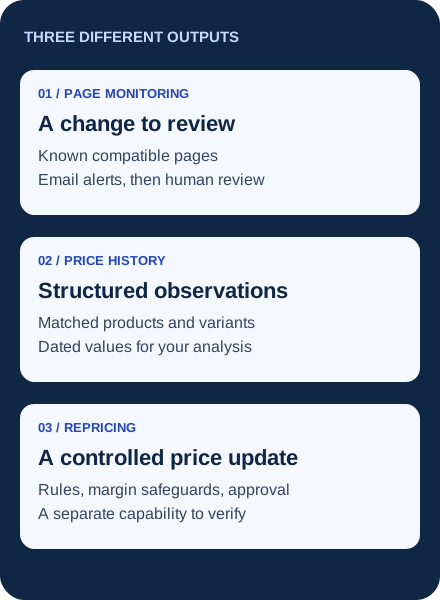
Three outputs lead to different buying decisions. An alert tells a person to review a change. A price dataset stores identified offers as structured records for comparison over time. Repricing changes your own selling prices according to rules or another decision process. Some products combine these functions, but you should verify the exact plan, integration and limits.
The distinction appears in suppliers' own product descriptions. Prisync's price tracking page describes price, stock and history features, while Price2Spy presents monitoring and repricing as distinct capabilities. These are vendor descriptions, not independent evidence of accuracy, coverage or commercial performance. Confirm features against your requirements rather than assuming every feature is included.
If you are shopping for a personal price-drop alert on a single purchase, a consumer tracker may be enough. A retailer comparing several sellers needs to evaluate product identity, observation timing and operational ownership as well. Keep that business requirement explicit when a search result mixes shopping apps with retail pricing platforms.
02. Map each price-tracking need to a capability
Use this table to classify the job. Its rows describe capabilities to evaluate, not guarantees about every product in a category. One business can need more than one row.
On a narrow screen, scroll the table horizontally. Keyboard users can focus its region and use the arrow keys.
| Your job | Capability to look for | Evidence to request | A mismatch to catch |
|---|---|---|---|
| Track exact product prices | Product and variant matching, structured price fields | The same identifier, size, pack and seller in each record | A different pack or default variant treated as your item |
| Follow known competitor product pages | Scheduled page monitoring and actionable alerts | Your selected pages, the accessible information and the email workflow | A generic demo that never checks your pages |
| Monitor promotions | Capture or review of offer terms as well as price | Dates, eligibility, coupon or member conditions | A conditional discount silently replacing the public price |
| Watch a category | A clearly defined page or catalogue coverage model | Pagination, sorting, loading behaviour and included items | One category URL presented as the entire catalogue |
| Notice broader page changes | Change detection with useful context | An alert a person can trace back to the source | A timestamp update repeatedly reported as a business change |
| Build historical pricing | Retained, timestamped records with stable identities | History depth, gaps, retention and usable retrieval/export | Assuming an email archive is a normalized price database |
| Update your own prices | Repricing integration with controls and auditability | Price floors, approvals, pause and recovery behaviour | Buying an alert service when you need write access to your store |
For product identity, Google Merchant Center's product data specification separates attributes such as identifiers, variants, price and availability. It is documentation for Google product feeds, not a certification of a tracking tool. It offers a useful checklist of fields that should not be collapsed into an unexplained number.
03. Write a one-page requirements brief
A useful brief states what is mandatory and what is optional. Avoid averaging away a critical failure with a high overall feature score: if automatic price updates are mandatory, a monitoring-only service cannot satisfy that requirement regardless of its price.
- Competitors and coverage: list the sellers and the exact pages or matched products you need. State which variants and destinations matter.
- Frequency: choose how often an observation is needed and how quickly your team can act. Ask whether the quoted interval is a schedule or a guaranteed detection time.
- History: specify how far back you need data, how long it must remain available and how you will retrieve it.
- Analysis: decide whether an email is enough or whether a person needs rows of comparable prices, an API or reports.
- Alerts: identify the recipient, useful context and the handling of ambiguous changes or failed checks.
- Repricing: explicitly state whether the tool must change your store's prices. Include approval and recovery requirements if it must.
- Budget: include setup, recurring subscription, extra capacity and the staff time needed to verify and use the output.
The number of competitors alone is a weak sizing metric. Three competitors with two selected pages each create a different job from three competitors with thousands of products. Ask what the supplier counts: product, URL, seller offer, check, channel or extraction. These units cannot be compared by their headline number alone.
04. Size the workload without inventing an ROI
FICTIONAL PLANNING EXAMPLE
A small outdoor retailer identifies three competitors and four known pages per competitor. It needs email alerts, a human review once each business day and no repricing. The team has not purchased or tested any software in this example.
The scope is 3 × 4 = 12 URLs. One scheduled check per URL per calendar day gives 12 × 1 × 30 = 360 scheduled checks in a hypothetical 30-day month. Three checks per day would give 12 × 3 × 30 = 1,080. These are workload calculations, not successful extractions, a vendor quota or a guarantee that every short-lived promotion will be seen.
Consider two possible needs. If the retailer only wants to know which known pages deserve attention, page monitoring may fit. If it needs a year of comparable prices for every size and pack, it needs verified historical and matching capabilities. Increasing the number of checks cannot turn the first output into the second.
Compare costs on the same basis: monthly operating cost = subscription + recurring add-ons + review hours × internal hourly cost. Add one-off setup costs separately for the period you are evaluating. Use your own observed review time and internal cost; do not convert a fictional number of minutes saved into a promised return on investment.
KNOWN PAGES, A PERSON TO REVIEW THE ALERTS
Check whether your shortlist fits ChangeWatch
If your recurring task is reopening important competitor pages to spot changes, ChangeWatch can monitor compatible pages and send email alerts. Start with the actual pages and the information you need to follow. You can request an optional compatibility check before subscribing, or subscribe directly and have your pages checked during setup.
Request a page compatibility checkHave three URLs ready for the form. This request does not subscribe you or automatically establish compatibility.
05. Test the difficult cases before committing
Ask for a demonstration using a representative sample, including a page that changes variants, a promotion with conditions and a category with pagination. Compare the output with a manual observation at a recorded time. Do not rely on a successful homepage check to infer that all product pages work.
| Test | What to record | Decision rule |
|---|---|---|
| Same product, different variant | Requested identifier, selected variant and returned value | Do not accept a match without enough identity information. |
| Conditional promotion | Public price, eligible price, condition and observation time | Do not combine member and public prices without a label. |
| Blocked or unreadable page | Failure status, last successful observation and recovery process | An unknown value must not silently become zero or unchanged. |
| Category page | Items and pages actually covered, sorting and loading limits | Accept only the coverage demonstrated for your required scope. |
| An alert arrives | Source, usable context, recipient and human follow-up | The recipient must be able to verify the change. |
| History or export is mandatory | Available period, record identity, missing intervals and a sample export | Test retrieval; a claim on a feature list is insufficient. |
| Repricing is mandatory | Rules, minimum price, approvals and pause/recovery evidence | Verify in a safe test environment before allowing live price writes. |
Set your acceptance criteria before the trial. A small sample can reveal a mismatch, but it cannot prove universal accuracy. If no relevant change happens during the trial, the alert behaviour remains untested; ask for a clearly labelled demonstration or a controlled test you are authorized to run. Never claim a successful observation that did not occur.
Questions worth asking directly
- What happens if a site changes its layout or blocks an automated check?
- Does the plan include setup and ongoing maintenance of the selected pages?
- When was a displayed value last successfully checked?
- Can the product distinguish a failed check from no observed change?
- Which historical records can I retrieve, in what format, and after cancellation?
- Who reviews an ambiguous match or promotion before it affects a decision?
These are procurement questions, not a list of features available in ChangeWatch. Keep unresolved answers visible in your brief. A cheaper subscription can still be unsuitable if it does not provide an essential output.
06. Where ChangeWatch fits — and where it does not
ChangeWatch serves professionals who already know important competitor pages and want automated monitoring of compatible pages with email alerts. Setup is included. Starter covers 5 URLs at €14.90/month; Business covers 15 at €29.90/month; both check once a day. Pro covers 40 at €59.90/month, with up to three checks a day. These are the standard plans. The Business launch offer for new customers is €14.90/month for the first three months, then €29.90/month, subject to the conditions on the pricing page.
The fictional 12-URL brief fits within Business's URL count, subject to compatibility. That arithmetic does not establish that all 12 pages can be monitored or that their entire content can be extracted. A category URL may cover only part of a paginated catalogue. Login requirements, page structure and protections can prevent access. This is scheduled monitoring, not real-time or exhaustive coverage.
Choose another capability set if your requirement is automatic repricing, complete catalogue extraction, a normalized historical price database or bulk price exports. ChangeWatch should not be purchased on the assumption that it supplies those outputs. It also does not perform your strategic analysis or choose your commercial response.
For the operating routine after a tool is selected, read our ecommerce competitor monitoring guide. For interpreting comparable prices, including delivery, discounts and median gaps, use the worked competitor price analysis. Those are separate tasks from selecting software.
Buy the output your team will actually use
Write down the required output, size the units correctly and test the difficult pages. Keep missing evidence and failed checks visible. The right method is the one that supports your team's decision process within a verified scope; a longer feature list is not a substitute for that fit.
MONITOR YOUR IMPORTANT PAGES
Turn your page shortlist into a monitoring plan
You can send three competitor URLs for an optional compatibility check before subscribing, or subscribe directly and have the pages checked during setup. You receive email alerts; your team verifies the context and decides what to do next.
For businesses. The pre-subscription enquiry is optional, but recommended here to establish compatibility. No payment is taken by the enquiry form. No guaranteed savings, conversion lift or price coverage.
Comments
Have a question, feedback or experience to share?