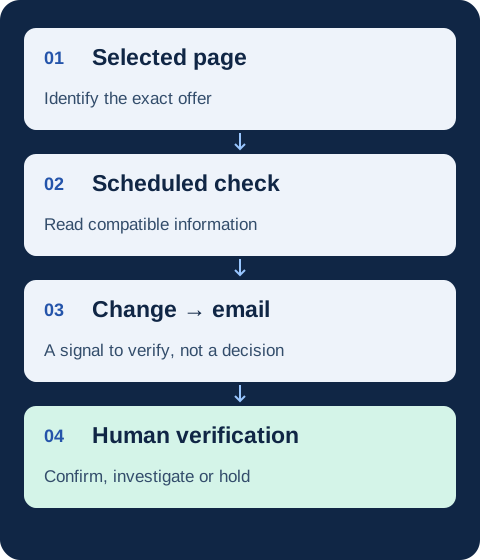
Competitor price monitoring means checking competing offers repeatedly so you can identify a change worth verifying. To make it useful, define the exact product and page, choose a check schedule, separate valid observations from failed readings, and assign someone to review alerts. A detected change is an input to a decision, not an instruction to cut your price.
This guide is a working procedure for an e-commerce team monitoring a shortlist of offers. It focuses on what happens between a scheduled check and a verified observation. For software selection, use our price tracking software buying guide; for calculating gaps and making a pricing case, use our competitor price analysis method.
Three separate jobs: monitoring observes changes over time; analysis interprets them using context and your own business data; automatic repricing changes your selling prices under configured rules. ChangeWatch supports selected-page monitoring. It does not perform automatic repricing or strategic analysis.
Define an offer you can recognise at the next check
Start with a stable public product URL and write down which offer it represents. Product matching means deciding whether two listings describe the same item or a genuinely comparable alternative. A similar name or photograph is not enough: capacity, pack size, model generation, condition and seller can change the comparison.
A GTIN is a trade-item identifier used to identify a product. Google’s GTIN documentation describes its use in product data. An identifier can help confirm a match, but you should still verify the variant and offer conditions. ChangeWatch does not automatically match a whole catalogue.
| Record | Why it matters | Example, entirely fictitious |
|---|---|---|
| URL and variant | Stops a changed default selection being treated as a price cut | Competitor A, black 1-litre model, one unit |
| Currency and market | Separates an offer change from a different regional context | EUR, same destination market at each check |
| Price conditions | Distinguishes a public price from a membership or coupon offer | €99, no membership assumed |
| Availability and delivery | Prevents treating an unavailable item as an immediately purchasable alternative | Availability displayed; delivery terms to verify separately |
| Check time and owner | Makes freshness and follow-up explicit | Monday 09:00, Europe/Paris; category manager |
This is your working record, not a promise of fields exported by ChangeWatch. Keep the source wording separate from your interpretation. If a delivery cost depends on a postcode or basket you have not checked, record it as unknown.
Choose a check schedule and a response window
Choose frequency from two questions: how short could a relevant offer be, and when can your team review it? More observations do not help if no one owns the response. Agree on a review window and a backup owner rather than treating every alert as an emergency.
Fictitious timing example: checks at 09:00 on Monday and Tuesday leave a gap of 24 hours. A promotion running from Monday 12:00 to 18:00 could be missed by both checks. If Tuesday’s check detects a change, you know it was observed on Tuesday; you do not know its exact start time from those two observations alone.
For a planned campaign, review whether the configured schedule and your own availability fit the decision you need to make. If you need continuous observation or guaranteed capture of short promotions, daily page checks are not a substitute. ChangeWatch offers daily checks on Starter and Business and up to three daily checks on Pro, not real-time monitoring.
Give every observation a status before acting
A false positive is a signal that looks like the change you wanted to detect but turns out to have another explanation: for example, a different variant became the default. The opposite risk also matters: no alert does not prove that every offer stayed unchanged.
Use the following statuses in your own review process. These are proposed team labels, not named ChangeWatch features. They help prevent a failed collection from silently becoming evidence of a stable price.
| Status | What it means | Next action |
|---|---|---|
| Unchanged, successfully observed | The selected information was readable and matched the previous valid observation | Keep its timestamp; do not infer coverage of other offers |
| Candidate change | A difference needs human verification | Open the source and compare the same variant and conditions |
| Confirmed change | The relevant difference has been checked in its context | Send a short evidence note to the decision owner |
| Uncertain or unavailable | The page, field or context could not be verified | Recheck the source or review the monitoring scope; do not reuse an old price as current |
Why a readable page can still be an uncertain observation
A dynamic page loads or changes some information after opening, often using JavaScript. The displayed price may depend on a selected variant, region or session. A new page layout may also move the information outside the portion being read. These are reasons to check compatibility, not to assume a blank result means a free product or an out-of-stock item.
If a source requires a login, blocks access or no longer exposes the relevant information, review the source choice. Do not make an unsupported conclusion from a partial reading. With ChangeWatch, compatibility depends on the public page and its accessible content.
Work through three alerts before changing a price
The following merchants, prices and conditions are entirely fictitious. Imagine three listings your team originally believed were comparable. The price movement is only the start of the check.
| Competitor | Before → now | Displayed change | Human verification |
|---|---|---|---|
| A | €99 → €89 | −€10 | Is this temporary? Does the same variant remain available? What does delivery cost? |
| B | €95 → €95 | €0 | Has its stock or free-shipping threshold changed even though the price has not? |
| C | €109 → €92 | −€17 | Is €92 a public price for one unit, or conditional on membership or a multi-buy? |
A lower displayed price can require no immediate response
Suppose A’s €89 offer has €8 delivery for the basket and destination being compared. That is €89 + €8 = €97. If B’s €95 offer includes delivery under those same conditions, B is €2 lower on that comparison. This is arithmetic for the fictitious scenario, not a claim that delivery is always captured automatically.
Check any promotion end date and eligibility wording. Google Merchant Center’s price guidance illustrates why product price and offer conditions need consistent treatment. Those are rules for submitting product data to Google, not a guarantee that a competitor’s page is complete or accurate.
An unchanged price still needs offer context
B’s displayed price has not moved, but its availability or delivery threshold might have. Conversely, a product disappearing from a category page does not prove that it is unavailable. Verify the product page and the exact variant. If the information cannot be confirmed, keep the observation uncertain.
A conditional price is not automatically comparable
If C’s €92 requires buying two units, it is not a €92 single-item alternative for a customer who wants one. Record the condition before circulating an alert as a confirmed comparable drop. Then ask whether your own margin, service proposition and customer needs justify a response. Monitoring alone cannot answer that question.
Know when a shortlist becomes a catalogue project
Monitoring a selected product page answers a narrow question about that page. Catalogue-scale monitoring additionally requires discovering products, maintaining matches across sellers, managing variants and keeping track of coverage. Those tasks do not become solved merely because a category URL is being checked.
Pagination splits a listing across multiple pages or loading steps. A product may move to another page because the sorting order changed. A “load more” button can expose items that were not present in the first portion. Record which parts are actually covered and do not treat the first visible set as the whole catalogue.
The distinction also exists in specialist products: Prisync distinguishes URL-based, channel-based and hybrid monitoring. This is a useful illustration of different scopes, not a claim that ChangeWatch offers these modes or a recommendation to buy a particular platform.
If your requirement is a normalised historical price database, bulk product matching or large exports, write those requirements explicitly and choose a system designed for them. ChangeWatch does not provide a normalised historical database, bulk exports, massive catalogue extraction or automatic product matching. For choosing between tool categories, return to the software selection guide.
Close the monitoring task with a short evidence note
Once a change is verified, send the decision owner enough information to assess it without treating your interpretation as fact. A useful handoff contains:
- The source URL and the time of the last successful observation.
- The exact variant, market and offer conditions checked.
- The previous observation and current observation, clearly separated.
- What remains unknown, including delivery, stock or promotion duration.
- The person responsible for deciding whether a response is justified and when to review it.
Do not fill an unknown field with a guess. “No pricing change recommended yet; promotion duration unconfirmed” can be a useful result. Repeated alerts for the same unresolved candidate should stay attached to that review rather than create multiple independent decisions.
At a regular team review, remove sources that no longer answer a business question and investigate sources repeatedly left uncertain. This is your operational routine, not an automatic quality report provided by ChangeWatch. Our broader e-commerce monitoring guide covers the wider scope, while the price analysis guide takes a verified comparison into a pricing decision brief.
Where ChangeWatch fits this workflow
ChangeWatch can take over repeated checks of selected compatible public pages and send email alerts when relevant changes are detected. Depending on the source, the accessible information may include price, promotions, displayed availability, products visible in the monitored portion or delivery terms.
It does not guarantee detection of every change, provide exhaustive competitor intelligence, crawl unlimited pages, analyse your margins, make strategic recommendations or change your prices. Page access, extraction and pagination can limit coverage. Analysis and commercial decisions remain human.
Current plans are Starter: €14.90/month for 5 URLs, Business: €29.90/month for 15 URLs and Pro: €59.90/month for 40 URLs. Starter and Business check daily; Pro checks up to three times daily. The displayed Business launch offer is €14.90/month for the first three months for new customers, then €29.90/month, subject to the pricing-page conditions. Setup is manual; payment does not automatically start monitoring.
Operational questions
Does competitor price monitoring require repricing?
No. You can monitor an offer, confirm a change and deliberately keep your own price. Automatic repricing is a separate capability with separate controls; ChangeWatch does not provide it.
How often should a team check competitor prices?
There is no universal interval. Consider the duration of relevant offers, source compatibility and the time your team can respond. Scheduled checks can miss changes between observations, even when performed several times a day.
Can I treat no alert as proof that prices stayed the same?
No. A change may have occurred between checks or outside the accessible portion. Confirm the source and the time of the last valid observation when the decision requires fresh evidence.
Start with offers your team can verify and use
A useful monitoring process ends with a trustworthy observation and a clear owner. Keep the scope small enough to explain, make uncertainty visible and separate the alert from the pricing decision.
Comments
Have a question, feedback or experience to share?