Retail price monitoring means repeatedly observing retail prices and the conditions attached to them. Before treating two prices as comparable, confirm the product variant, seller, pack size, customer eligibility, tax display, stock and delivery context. A lower number can describe a different offer rather than a better deal.
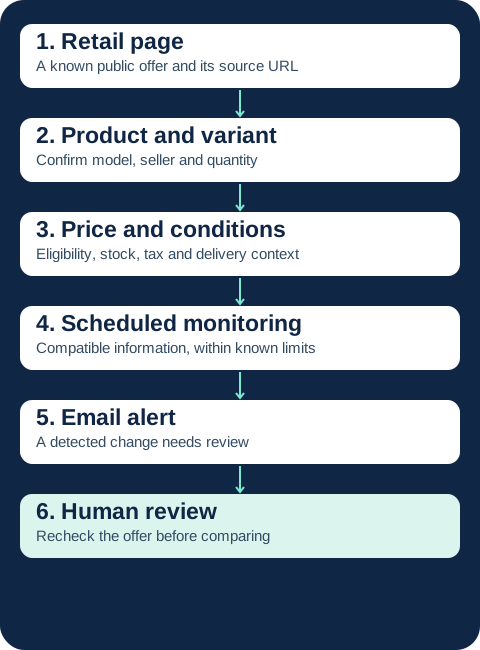
This guide is for retail and e-commerce teams reviewing public online offers. Its focus is the practical work between opening a product page and accepting an observation into a retail comparison. It does not cover physical store audits, select a software vendor or design a repricing strategy. Those are separate tasks.
The working unit is an offer, not just a product
A SKU, or stock keeping unit, is a retailer's internal identifier for an item it manages. The same SKU text at two retailers does not, by itself, establish the same product. Product matching means checking whether listings refer to equivalent items. A variant is a version distinguished by attributes such as size, colour, capacity or material.
Start with a purchase scenario: one new unit of a specified model and variant, sold by a named seller, to an ordinary customer in a defined delivery area. Change any of those conditions and you may need a separate comparison. Keep the original observations even when they are excluded from that scenario; exclusion is not evidence that the offer has no value.
For a concrete illustration of variant identity, Google's item group documentation distinguishes a group of related products from the individual variants within it. Those rules apply to Merchant Center submissions, not to every monitoring service. The useful operational lesson is to record the distinguishing attributes rather than rely on a shared name or image.
Seven checks before a retail price enters the comparison
Use this as a review sheet for your selected offers. “Unknown” is a valid result. Do not turn an inaccessible field into a guessed value, and do not assume that a page-monitoring service extracts each field in the table.
| Check | What to record | When to separate or hold the offer |
|---|---|---|
| Product and variant | Brand, model, identifying code if available, size, colour, capacity and condition | Different capacity, refurbished item or unconfirmed variant |
| Seller identity | Retailer or actual marketplace seller attached to the offer | Seller changed, even if the URL did not |
| Pack and quantity | Units, weight or volume, minimum order and included accessories | Single unit compared with a bundle or minimum multi-buy |
| Price eligibility | Ordinary price, coupon, membership, subscription or first-order condition | Customer in the scenario cannot obtain the displayed price |
| Tax and currency | Currency, displayed tax basis, market and time observed | Tax inclusion or storefront context is unknown |
| Delivery | Destination, basket size, shipping fee, threshold and method | Delivery price is personalised or requires an unverified basket |
| Stock and timing | Selected variant's availability, delivery promise and promotion period | Unavailable variant, preorder or expired promotion |
A useful minimum record is therefore an offer identity plus a timestamp and source URL, not simply “Retailer A: €69”. This record is something your team maintains; it is not a promise that ChangeWatch builds a normalised price database. For the wider scheduling and handoff process, use the competitor price monitoring operating procedure.
Quantity can invalidate an apparently simple match
A two-pack at €12 has an arithmetic unit cost of €6, but a shopper must still spend €12 to buy it. Record both the minimum purchase and the unit calculation. A bundle with an accessory is another offer, even when the core model is identical. Do not remove the extra component's value with an invented estimate just to force a match.
A stock label belongs to a particular selection
“In stock” beside a product family may refer to the default size, not the size you sell. Reopen the selected variant before treating the price as immediately actionable. Record a preorder separately from an available item; a lower price with a different delivery date answers a different customer need.
Promotions change eligibility as well as price
A crossed-out price and a current price are two values displayed today. They are not, by themselves, your historical record of what shoppers paid. Preserve the visible promotion wording and any start or end date. If no end date is shown, record it as unknown rather than infer it from a seasonal banner.
A member-only price needs its own comparison group. Membership may have an eligibility requirement, a fee or benefits unrelated to this item. Record those conditions where public; do not automatically spread an annual fee across a guessed number of purchases. Similarly, a first-order coupon, app-only offer or subscription price is not an ordinary single-purchase price.
Google's price attribute documentation provides a useful reference for distinguishing the price submitted to its service from conditional pricing and the landing-page experience. This is a platform-specific source, not a legal assessment of a retailer's promotion or a universal collection specification.
Seasonal campaigns also change which products deserve attention. Review the shortlist before and after a campaign instead of leaving every seasonal URL active indefinitely. A short promotion can appear and disappear between scheduled observations. More frequent checks reduce some gaps but do not prove that every change was captured.
Retailer, marketplace and category pages need different checks
On a retailer's own product page, the offer may still change with the selected location or variant. On a marketplace, the main offer can additionally switch to another seller. Record “sold by” separately from fulfilment or delivery information where those distinctions are shown. A stable product URL does not establish a stable seller or return policy.
A category card may show a “from” price for the cheapest variant, a sponsored item or only the first part of an assortment. Follow the relevant product link to qualify the offer. Pagination splits results across pages; progressive loading reveals more items during interaction. Neither the first category page nor its current ordering is evidence of complete catalogue coverage.
A dynamic page loads or adapts content during a visit. If a price depends on a login, delivery address or interactive selection that cannot be read reliably, keep that observation out of the automated comparison until the uncertainty is resolved. A false positive in this workflow is a signal treated as a relevant offer change when it actually comes from a different variant, rotating block or other unrelated content.
A fictional price drop that is not the cheapest delivered offer
Entirely fictional scenario. Assume one identical new item and variant, quantity one, the same currency and tax-display basis, and the same delivery destination. Assume A and B have confirmed stock and the stated delivery terms. These are teaching assumptions, not customer data or measured ChangeWatch results.
| Fictional retailer | Displayed price | Condition | Delivered comparison |
|---|---|---|---|
| A | €79 → €69 | €8 shipping | €69 + €8 = €77 |
| B | €74 | Free shipping | €74 + €0 = €74 |
| C | €82 → €70 | Member price only; shipping unverified | Not established for this customer scenario |
A's displayed price fell by €10, but its delivered total is €3 higher than B's: €77 − €74 = €3. For this exact scenario, B costs less than A. C cannot automatically be called the cheapest comparable offer: the customer's eligibility and delivery conditions have not been verified. Its €70 is a conditional item price, not an established delivered total.
Now suppose A offers free delivery from €100. Buying an extra item to reach that threshold changes the basket; it does not make shipping free for the original one-item scenario. Keep the €77 result unless you deliberately define a second basket comparison. Google's shipping specification illustrates how delivery can depend on destination and order value. A public shipping policy can inform a check without guaranteeing the final charge for every address.
The useful output for the retail team is a qualified observation, not an instruction to cut its own price. Check that the offer is still live before using it. For price-gap calculations and interpretation beyond this example, continue with the competitor price analysis guide.
Monitoring observes; analysis interprets; repricing acts
- Monitoring observes relevant changes on selected sources at the times checked.
- Analysis interprets those observations using a consistent purchase scenario and business context.
- Repricing changes your own prices. Automatic repricing is a separate capability, not a consequence that every monitoring alert should trigger.
Do not connect an uncertain marketplace or member-price observation directly to a price decision. Someone must first establish whether the offer belongs in the comparison. That person may conclude that nothing should change. A competitive price does not reveal the competitor's costs, margins or sales.
If you need to choose between page alerts, structured pricing data and repricing, see the price tracking software guide. If the information you need is instead SEO visibility, social activity or advertising, the competitor monitor tool category guide explains the different source types.
Where ChangeWatch helps a retail team
ChangeWatch monitors selected compatible public web pages and sends email alerts when relevant changes are detected. It can fit a team that already knows the competitors and the pages it repeatedly checks. Depending on compatibility, accessible prices, promotions, availability, delivery conditions and other public commercial information may be monitored.
It does not perform automatic repricing, automated strategic analysis, business decisions or strategic recommendations. It does not provide exhaustive website crawling, massive catalogue scraping by default, automatic bulk product matching, a full normalised historical price database, bulk exports or unlimited monitoring. Scheduled checks are not real-time surveillance and cannot guarantee detection of every change.
Product matching, offer qualification and the commercial response remain your team's work. Extraction and pagination can limit coverage; a personalised basket or members-only area is not assumed compatible. For the wider organisation of roles and sources, use the ecommerce competitor monitoring guide. The retail checklist above remains useful even if you keep the observations manual.
Retail operations questions
Can we monitor only category pages?
You can use them as discovery points, but they may show partial ranges or starting prices. Validate the actual variant and seller on the relevant product page before accepting a comparable price.
Should out-of-stock prices be deleted?
Keep the observation and its stock state separately. It can explain a promotion or assortment change, but it is not automatically an available alternative for the customer in your scenario.
Does no alert mean the retail offer stayed identical?
No. There may have been a short-lived promotion, a reading failure or a change outside the accessible part of the page. Use the time and scope of the last valid observation when deciding whether the evidence is current enough.
Monitor the pages your team can actually use
Take one purchase scenario, qualify the offers and decide which pages need repeated checks. Preserve unknowns and conditional prices instead of forcing a single ranking. Once that shortlist is useful, reducing repeated visits becomes a concrete automation task.
Comments
Have a question, feedback or experience to share?